Open topic with navigation
Real Estate Portfolio Management / Portfolio Management / Buildings, Structures. Land processes
Selected Buildings, Structures, or Land Views
The Selected Buildings, Structures, or Land view is one of two tabs included in the Manage Buildings, Structure, or Land task. This view is included on the Buildings, Structures, or Land Dashboards. Or, you can access the Manage Buildings Structures, or Land task as a single view from the Process Navigator.
After selecting and filtering portfolio items from the selection list, use the Selected Buildings, Structures, or Land view to:
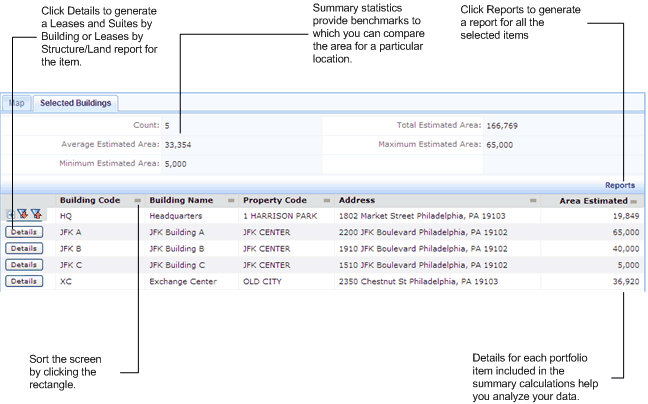
- View summary statistics for the portfolio items you have selected. Summary statistics include the total, average, maximum, and minimum for the portfolio items you select, and details for each building, structure, or land included in the summary. These summary statistics are benchmarks against which you can compare an individual building's estimated area.
- Generate a Leases and Suites by Buildings report, or Leases by Structures or Land report for individual portfolio items by clicking Details in the row for the building, structure, or land. If you rent out some of the facility areas that you own or lease,this report shows your data broken down by the active leases for which you are the landlord, active leases for which you are the tenant, what is in the pipeline for you to rent for your own use, and what is in the pipeline for you to lease to others. These breakdowns clarify how you are currently using your facility areas, and help predict future needs.
- Generate any of the following reports for all the items you have selected by clicking Reports:
- Leases and Suites by Building
- Leases by Structures/Land
- Buildings/Structures/Land by ... location
- Documents associated with buildings, structures, land, or leases
- Contacts associated with buildings, structures, land, or leases
To sort the screen, click the rectangle next to the column you want to sort by.
The following image shows Manage Buildings by Location with the Selected Buildings view selected.
See Also
Selecting and Filtering Portfolio Items
Map View